A day in the app
One working day, inside ShowUp.
Every screen below is the running product on a real register. No slides, no mock-ups: this is a Friday from the first sign-in to the last message, in the order it happens.
The door has your name on it.
Everyone signs in at your own address: you, your teachers and your families. A six-digit code arrives by email. No passwords to reset, no app store. Paste a logo and pick a colour in settings, and the door, the app and every message wear them in seconds.
A family never installs anything. They open a link and type the code from their inbox. They are in, on the centre's own address and under the centre's own name.
Sign-in codes last five minutes, allow five attempts, and submit themselves on the sixth digit.
8:05am
The day starts already added up.
One screen, first thing in the morning. It shows who is due today, which classes run and which family needs a word. The night's arithmetic is done before the first student signs in.
Nothing here asks to be configured. The dashboard reads the register and ledger you already keep in ShowUp. The morning opens with answers, not tabs.
8:52am
An app your teachers will actually open.
Her phone answers one question: what attendance is left to record? It has four tabs and today's classes in order. Teachers never see fees, by design.
When a centre asks for it, she checks in at the venue first. The geofence widens to match her phone's GPS accuracy, capped, so a weak city signal never locks out a teacher who is really in the room.
It also spots who is drifting away. A needs-attention card names the student, with two misses in a row and the date last seen. Tapping the card does not dismiss it. It opens a make-up offer at a time that already suits them.
That roster screen once made 120 requests to load. It now makes 20, measured on the real screen before and after.
9:00am
9am means 9am where you are.
Fee reminders go out at a decent hour in every timezone. The scheduler ticks every half hour, so even a half-hour offset like India lands on nine o'clock, not half past.
The cadence is gentle by design: one reminder every two days, five at most. Then it stops and flags the family for a word from you. A new family is never chased before their first class is even recorded.
Every automated message is previewed word for word here, and any of them can be switched off.
An assistant that already knows your centre.
It knows your register, your ledger and your families. Ask a question and it answers with names, amounts and next steps from your own records, never a guess.
- Who owes me right now?
- Who's drifting away?
- What did we collect this week?
- Remind the overdue families.
And it never acts alone. It proposes; the confirm tap is yours, every time.
10:22am
One keystroke, any job.
Type "collect payment" and the palette answers with the action, not a page. It knows the job you mean: record a payment, mark attendance, find a student. The control that does it lands under your fingers.
There is nothing to memorise. The palette uses the same words as the buttons, so the jobs you repeat all day start with one keystroke.
Every action here is the same one the buttons do. Nothing special, just faster.
12:40pm
Reach exactly the right families.
Describe who you want to reach: a day, a time, a subject, a grade or a batch. The assistant turns that into the exact list of families and shows you every name. Nothing sends until you confirm it.
Before it sends, you see the honest coverage: who is reachable by app, who by email, and who by no channel at all. Anyone it cannot reach comes with a ready-to-copy message, so you can send it yourself.
Festival greetings come pre-written for the calendar your families actually keep.
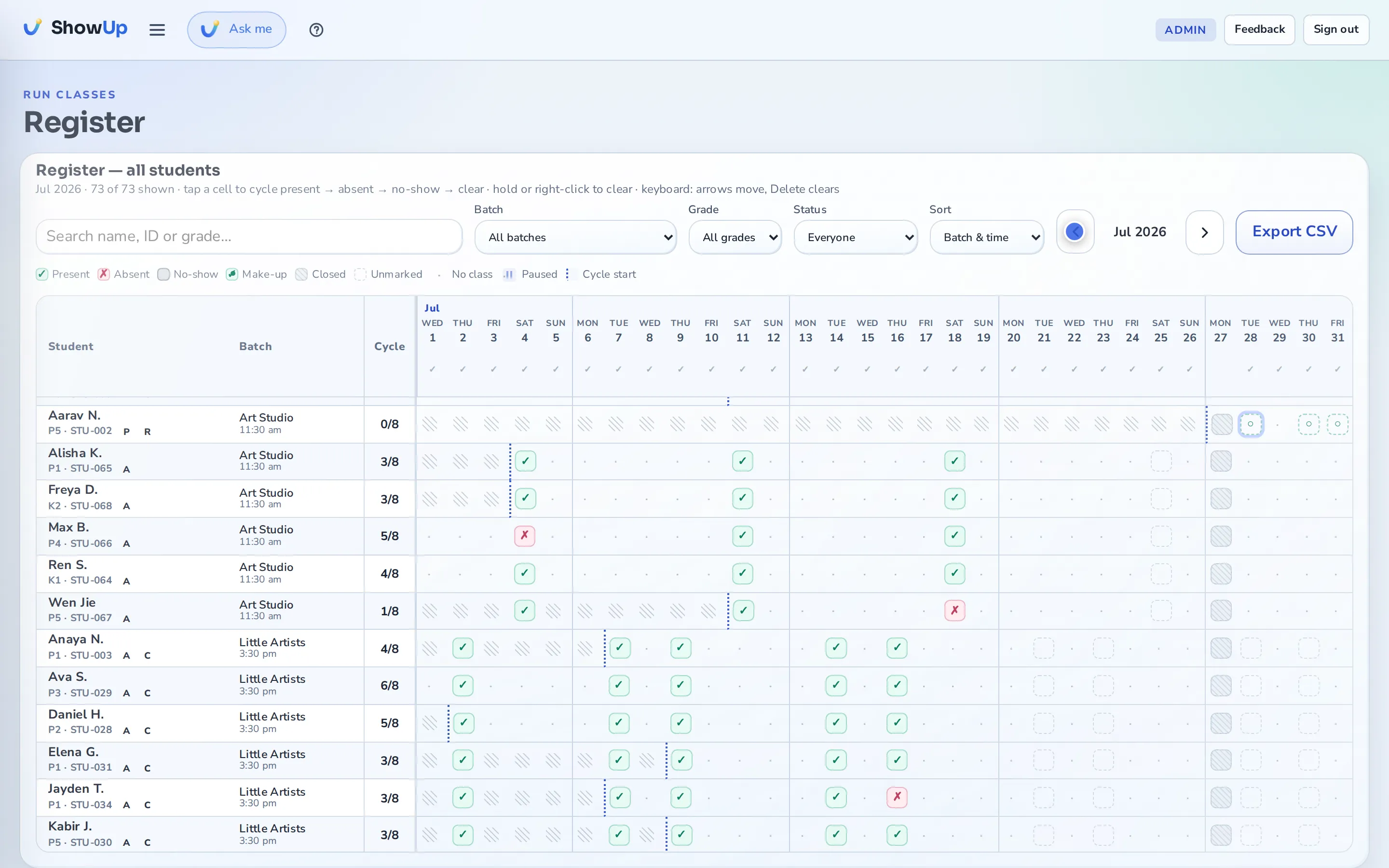
A month of attendance without the mouse.
The whole month is one grid. Arrow keys move across it. Home and End jump to the ends of a row. Present, absent, no-show and clear are one key each.
A deliberate no-show is not the same as an absence. A no-show uses up the paid class, because the seat was held and nobody came. An absence does not.
Around three thousand cells, and one tab stop, verified in a real browser rather than asserted in a checklist.
5:20pm
Your real week, not a nine-to-five grid.
Split shifts collapse the dead middle of the day. Two classes at the same hour sit side by side in their own lanes, instead of overlapping. The map heats as slots fill, so a class with room is obvious before you turn a family away.
Capacity counts per day and time rather than per class, so a Monday to Thursday group capped at six can hold seven as long as no single day goes over.
6:05pm
Collections, outstanding, and what's at risk.
See what you collected this month and what is still outstanding. The screen names the families about to drop off, and the revenue at risk if they leave.
A forecast appears only once four months of real payments sit behind it, and it always says at current trend.
Committed run-rate is shown as the forward value of active cycles, never as cash in hand, and every figure opens the records behind it.
7:10pm
The fee explains itself, so nobody has to.
A family opens the app and reads the reason, not just the number: which cycle, which classes, what is left. They watched the progress ring fill class by class, so the fee is old news before it is due.
A fee you waived reads as waived, never as paid.
8:15pm
Your records are locked at the database, not just the app.

Your centre's records are walled off inside the database, not just in the code that reads them. Sign-in cannot reveal whether a family exists. Exports open safely in Excel. Backups are restored and checked, not just taken.
If something failed today, you already know.
A message that could not get through does not disappear quietly. It appears on your screen in plain words: which family, which message and why. There is a button to send it again, and it retries on its own about every half hour.
When nothing is wrong, that card shows nothing at all. No badge, no fake reassurance.
Nothing left to send.
From S$19 a month · 60-day money-back promise
That day is available from tomorrow.
Bring your register across yourself tonight, or send us the spreadsheet and we will do it together. Either way you teach tomorrow.